An Evenly Spacing Calculator is a mathematical tool used to determine equal distances between multiple objects within a fixed boundary. It calculates spacing by considering total available length, number of items, and optional item width. The tool is widely used in engineering, architecture, design, and production planning where uniform distribution is essential. Instead of manual trial-and-error, it applies structured formulas to ensure precise placement. This ensures that objects are neither overcrowded nor unevenly distributed. By maintaining consistency, the calculator supports both functional efficiency and aesthetic alignment in professional and technical environments, making layout planning significantly more reliable.
Detailed explanations of the calculator’s working
The Evenly Spacing Calculator works by taking user-defined inputs such as total length, number of items, and item width. Once these values are entered, the system applies mathematical formulas to determine equal spacing between elements. It first calculates the usable space by subtracting total item width from the overall length. Then, it divides the remaining space based on the number of gaps required. Depending on the selected mode, it either distributes spacing between items only or includes margins at both ends. Finally, it generates precise position values for each item. This automated process reduces manual miscalculations and ensures consistent alignment across structural, design, or production layouts, improving overall efficiency.
Formula with Variables Description
Even Spacing Calculator:
Let:
L = Total available length
n = Number of items
w = Width of each item (use 0 if items have no width)
Equal spacing between items (center to center):
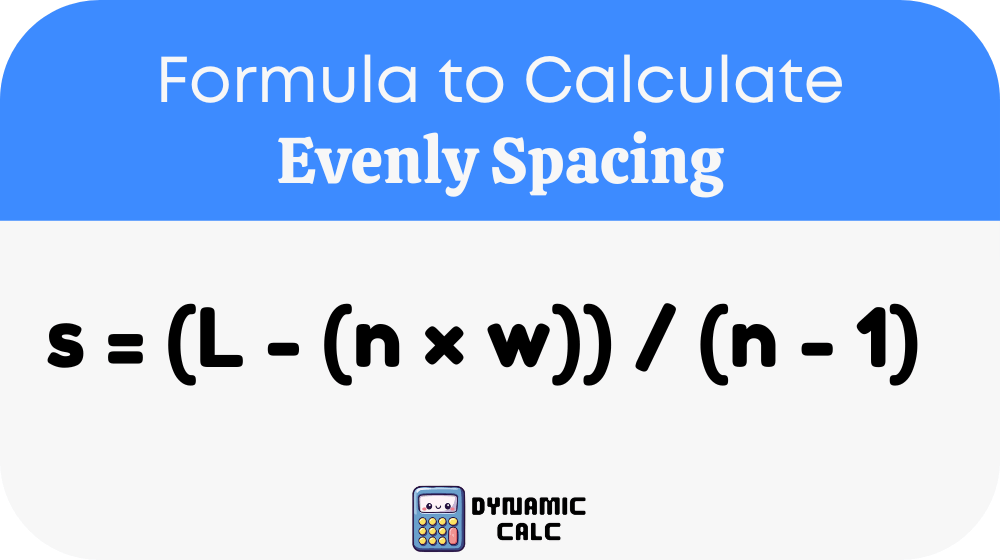
Equal spacing including margins on both ends:
s = (L – (n × w)) / (n + 1)
Position of k-th item (k starting from 0):
P_k = s + (k × (s + w))
Quick Reference Table for Common Calculations
| Items (n) | Length (L) | Item Width (w) | Spacing (s) Formula Use | Typical Use Case |
|---|---|---|---|---|
| 2 | Any | 0 | (L – 0) / 1 | Simple alignment |
| 3 | 100 | 10 | (L – 30) / 2 | Shelf layout |
| 5 | 200 | 15 | (L – 75) / 4 | Panel design |
| 10 | 500 | 20 | (L – 200) / 9 | Industrial spacing |
This table helps users quickly estimate spacing without repeatedly performing manual calculations.
Example
Assume a wall length of 200 cm with 4 identical frames, each 10 cm wide. Using the spacing formula:
s = (200 – (4 × 10)) / (4 – 1)
s = (200 – 40) / 3
s = 160 / 3 = 53.33 cm
Each frame will be placed with approximately 53.33 cm spacing between centers. This ensures uniform alignment and balanced visual structure. If margins are included, spacing will adjust slightly, maintaining symmetry across the full wall layout.
Applications with subheadings
Construction Layout Planning
In construction and civil engineering, the Evenly Spacing Calculator ensures precise placement of structural elements like columns, beams, and fixtures. It prevents uneven load distribution and enhances structural integrity. Engineers use it to maintain uniform spacing in layouts where accuracy directly affects safety and performance.
Interior and Graphic Design Alignment
Designers use this calculator to align furniture, frames, text blocks, and visual elements. It helps maintain symmetry and aesthetic balance in interior spaces and digital compositions. Consistent spacing improves readability, visual flow, and professional presentation in both physical and digital designs.
Manufacturing and Industrial Layouts
In manufacturing, the calculator assists in positioning components on assembly lines or machinery setups. Even spacing ensures smooth workflow, reduces errors, and optimizes production efficiency. It is especially useful in automated systems where precision placement is critical.